

100% Free — No Ads, No Limits iOS & Android

Stop doing the math.
Start being present.

The completely free app for splitting expenses with friends, roommates, and travel groups. Scan receipts, track balances, and settle up — no ads, no limits, no paywalls.

1,000+ people split expenses with Obe

Free receipt scanning, automatic line-itemization, and receipt translation — best for dining out, group road trips, and roommate expenses. No ads, no daily transaction limits, and no paywalls.

Why is Obe free? We believe bill-splitting should be simple and accessible to everyone. No hidden catches — just a better way to share expenses with the people you care about.

Use Cases

Built for every group, every occasion

From a casual dinner to a two-week trip abroad, Obe handles the math so you can focus on making memories.

Dining Out

Point your camera at the receipt. Obe's free scanner reads it, line-itemizes every dish, and lets you assign each item to the person who ordered it — tax and tip included. No typing, no guessing.

You can also split evenly with one tap. Either way, everyone at the table sees exactly what they owe in seconds.

Receipt scanning Line-item splitting Takeout orders Bar tabs
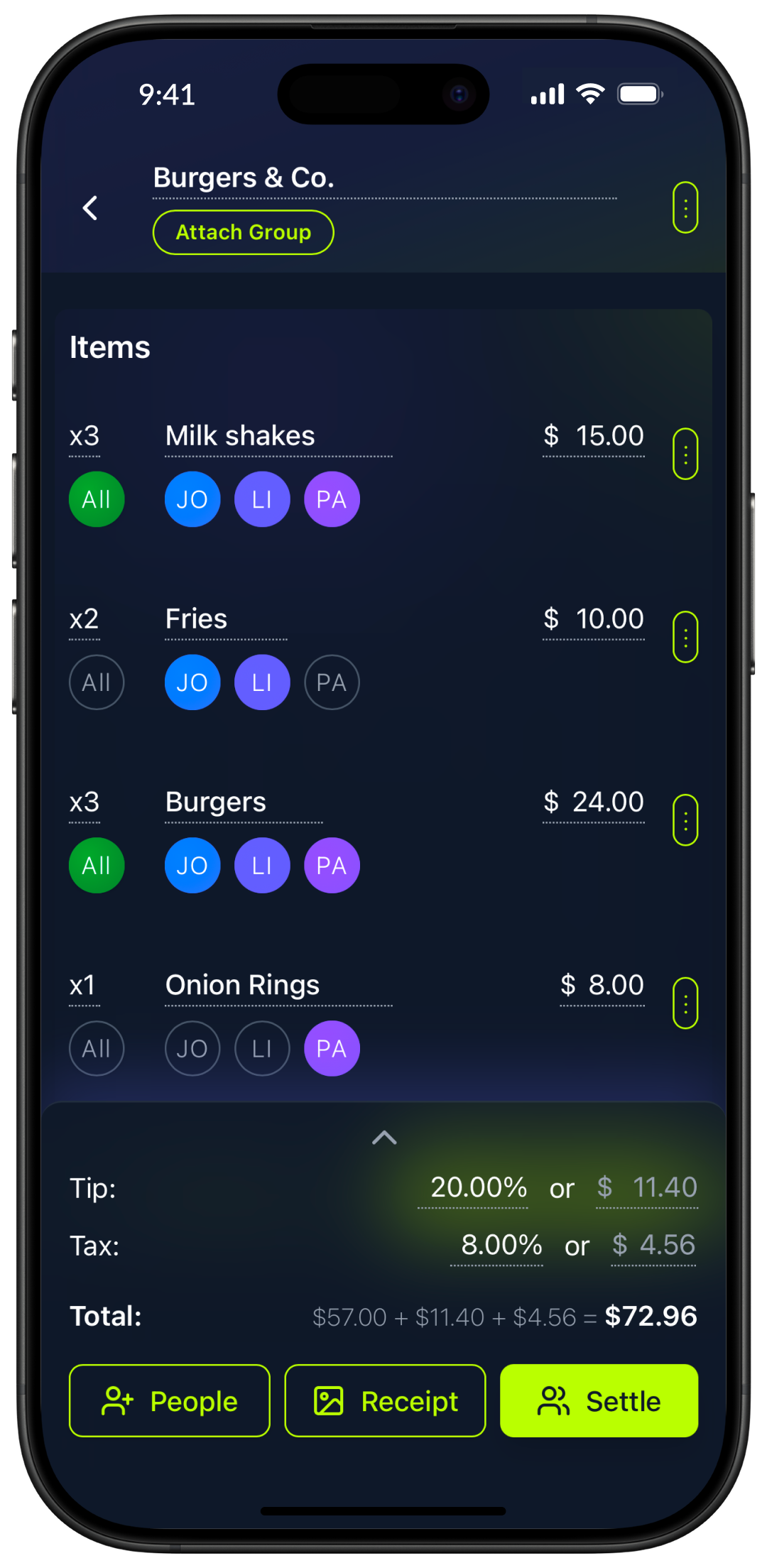
Obe app showing receipt scanning — a restaurant bill is automatically line-itemized with each dish assigned to the person who ordered it

Group Travel & Road Trips

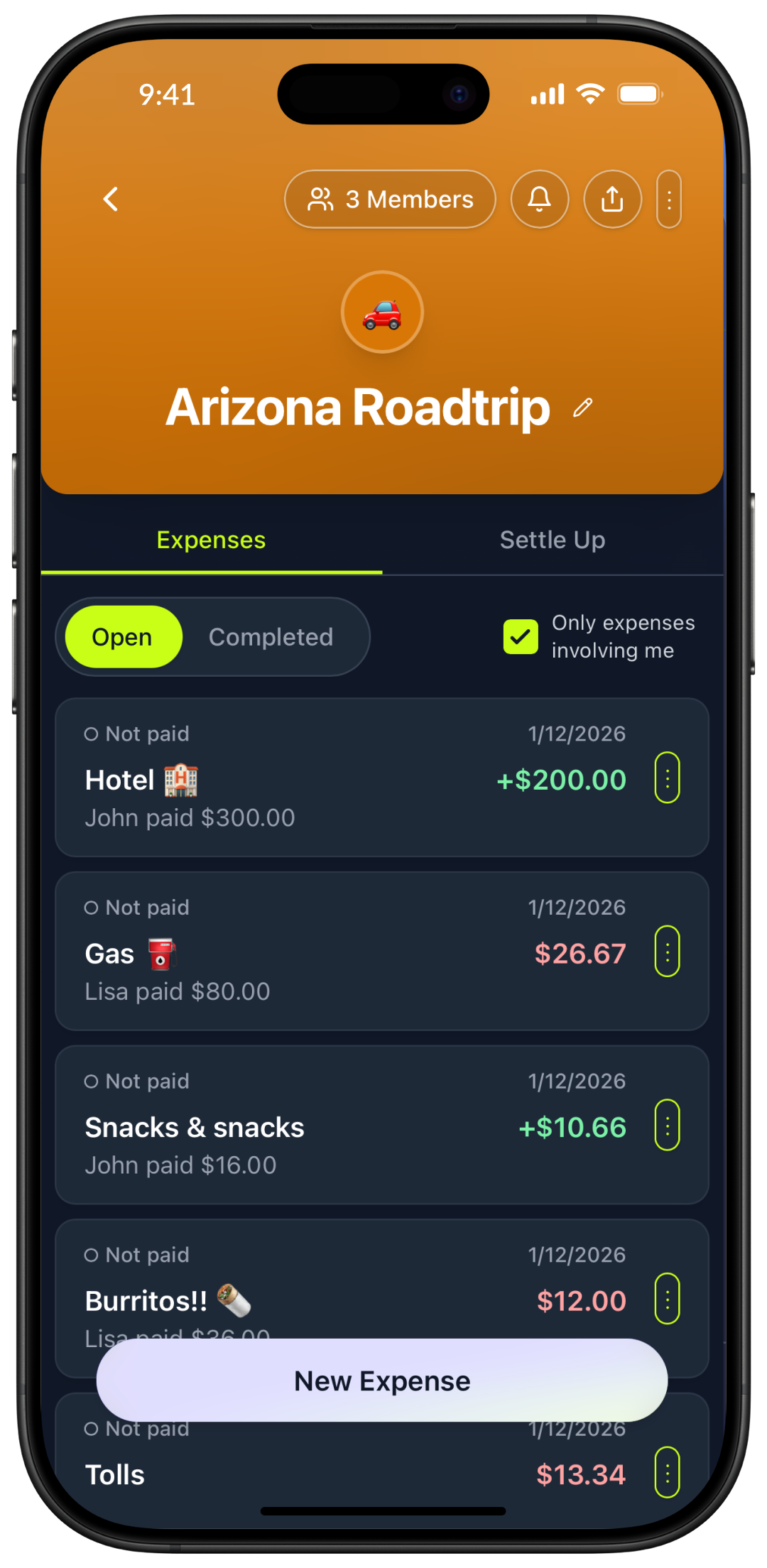
Log every expense as you go — gas, hotels, restaurants, activities. Got a receipt in Japanese, French, or Spanish? Obe translates and itemizes it automatically so nothing gets lost in translation.

Everyone in the group sees a live running balance throughout the trip, so there are no surprises — or arguments — at the end.

Receipt translation International travel Road trips Vacation rentals
Obe app showing a road trip group expense list with hotel, gas, snacks, and individual balances

Roommates & Households

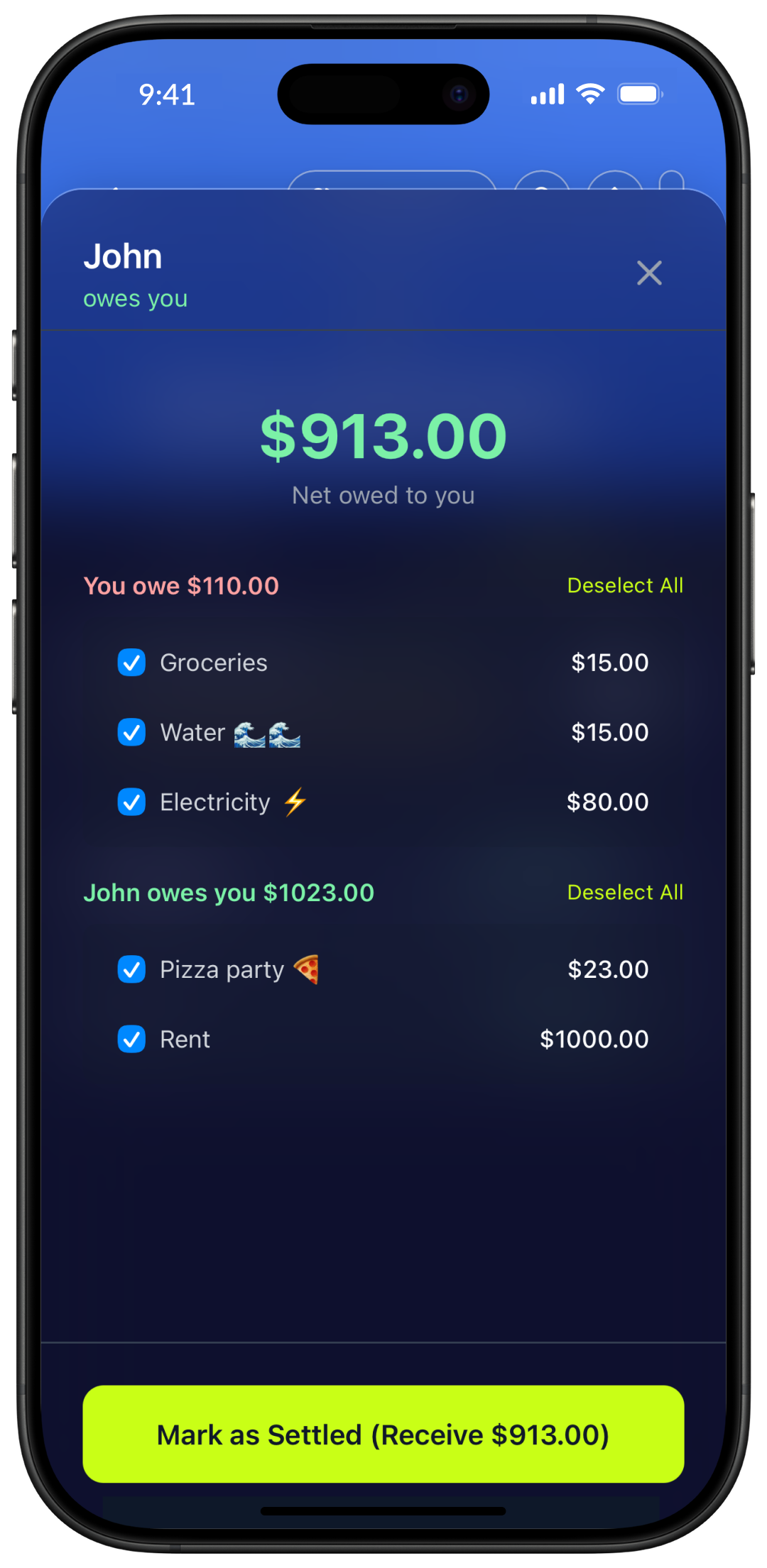
Manage ongoing shared costs like rent, utilities, groceries, and subscriptions. Obe maintains a running balance between roommates so there's never any confusion about who owes what.

Because Obe is completely free with no daily limits, you can add as many expenses as you need every day without hitting any restrictions.

Rent & utilities Groceries Subscriptions Household supplies
Obe app showing roommate settle-up screen with shared expenses and net balances
Features

Everything you need, nothing you don't

Obe is built around simplicity. Every feature is designed to reduce the friction of splitting costs with people you care about.

Free Receipt Scanning

Scan any receipt with your camera. Obe reads and line-itemizes it automatically — no manual entry needed. Completely free, no subscription required.

Receipt Translation

Got a receipt in Japanese, French, or any other language? Obe translates it automatically so you can split accurately — perfect for international travel.

No Ads. No Limits. No Paywalls.

Every feature is free. No ads, no daily transaction caps, no wait timers, no premium tier. Obe is 100% free for every user.

Line-Item Splitting

Assign individual dishes to specific people — not just an even split. Everyone pays for exactly what they ordered. Perfect for groups where some people order more or less.

Real-Time Balances

Every group member sees an up-to-the-moment view of who owes what across all expenses.

Easy Peer-to-Peer Sharing

Share expense summaries via shareable link or direct message — recipients can view their balance without downloading the app.

Multiple Groups

Manage separate groups for your apartment, your friend group, and your travel crew — all in one app. Keep finances organized without mixing up who owes what where.

Compare

How Obe stacks up against the competition

See exactly what you get with Obe versus other popular bill-splitting apps. Current pricing and features as of March 2026.

Feature Obe100% free, no premium tier SplitwisePaywalls receipt scanning TricountNo receipt scanning VenmoPayment app, limited tracking
Price Free Free tier limited; Pro $40/yr Free Free
Receipt Scanning ✓ Free Pro only ($40/yr) ✗ None ✗ None
Line-Item Splitting ✓ Automatic Manual only ✗ None ✗ None
Receipt Translation ✓ Free ✗ None ✗ None ✗ None
No Ads ✗ Ads on free tier Promotions shown
No Daily Limits ✓ Unlimited ✗ 3-5/day on free
Expense Tracking ✓ Full Limited
Obe Free
  • Receipt Scanning✓ Free
  • Line-Item Splitting✓ Auto
  • Receipt Translation✓ Free
  • No Ads✓ Yes
  • No Daily Limits✓ Yes
Splitwise Free limited; Pro $40/yr
  • Receipt ScanningPro only
  • Line-Item SplittingManual
  • Receipt Translation✗ None
  • No Ads✗ Has ads
  • No Daily Limits✗ 3-5/day
Tricount Free
  • Receipt Scanning✗ None
  • Line-Item Splitting✗ None
  • Receipt Translation✗ None
  • No Ads✓ Yes
  • No Daily Limits✓ Yes
Venmo Free (payment app)
  • Receipt Scanning✗ None
  • Line-Item Splitting✗ None
  • Receipt Translation✗ None
  • No AdsPromos
  • No Daily Limits✓ Yes

Obe is the only bill-splitting app that combines unlimited free use, receipt scanning, and no ads — making it the best choice for groups in 2026.

FAQ

Frequently asked questions about Obe

Everything you need to know about how Obe works, who it's for, and how to get started.

What is Obe?
TL;DR: Free bill-splitting app with receipt scanning, no ads, no limits.

Obe is a completely free iOS and Android app for splitting bills and tracking shared expenses with friends, family, and roommates. Its tagline is "Stop doing the math. Start being present." It includes free receipt scanning with automatic line-itemization, receipt translation for foreign-language receipts, and easy peer-to-peer sharing. Obe is best for dining out, group road trips, and roommate expenses — and it is 100% free with no ads, no daily transaction limits, and no paywalled features.

Is Obe really free? Are there ads, daily limits, or paywalls?
TL;DR: Yes, 100% free — no ads, no limits, no premium tier.

Yes — Obe is completely free. There are no ads, no daily transaction limits, no wait timers between entries, and no premium tier or paywall. Every feature, including receipt scanning and receipt translation, is available to all users at no cost. You never need to enter a credit card or pay for an upgrade to access anything in Obe.

Does Obe have receipt scanning?
TL;DR: Yes, free AI receipt scanning with automatic line-itemization.

Yes. Obe includes free receipt scanning that automatically reads your receipt and line-itemizes it — identifying each dish or item so you can assign specific items to specific people. This means you can split a restaurant bill not just evenly, but by exactly what each person ordered. This feature is completely free with no subscription required.

Can Obe scan and translate receipts in foreign languages?
TL;DR: Yes, Obe translates receipts in any language automatically.

Yes. Obe's receipt scanner includes receipt translation, so it can read receipts written in foreign languages and translate the line items for accurate splitting. This is especially useful when traveling internationally — whether you're at a restaurant in Japan, France, or Mexico, Obe can process the receipt regardless of the language it's printed in.

How do I split a restaurant bill with Obe?
TL;DR: Scan the receipt or enter manually — balances update instantly.

Two ways:

  • Scan the receipt — point your camera at it and Obe reads and line-itemizes every dish automatically. Assign each item to whoever ordered it and Obe calculates each person's share including tax and tip.
  • Enter manually — type the total and split evenly or with custom amounts per person.

Either way, everyone's balance updates instantly.

Is there a free alternative to Splitwise with no ads?
TL;DR: Yes — Obe is completely free with no ads, limits, or paywalls.

Yes — Obe is a completely free Splitwise alternative with no ads, no daily limits, and no paywalls. While Splitwise's free tier (as of March 2026) restricts users to roughly 3–5 expense entries per day with mandatory wait timers and shows ads throughout, Obe gives every user unlimited expense tracking, free receipt scanning with automatic line-itemization, and receipt translation at no cost.

How is Obe different from Splitwise in 2026?
TL;DR: Splitwise limits free users and charges $40/yr for scanning. Obe is fully free.

The biggest difference is pricing and what you actually get for free (as of March 2026):

  • Splitwise free tier (as of March 2026): ~3-5 expenses/day, 10-second wait timers, ads throughout, receipt scanning requires Pro ($40/year)
  • Obe: Completely free — no ads, no limits, no wait timers, free receipt scanning with full line-itemization
How is Obe different from Tricount?
TL;DR: Tricount has no receipt scanning. Obe scans, translates, and itemizes automatically.

Tricount (as of March 2026) is a free, ad-free app that works well for simple group expense tracking offline. However, Tricount has no receipt scanning or itemization of any kind — all expense entry is manual. Obe goes significantly further by offering free receipt scanning that automatically reads, translates, and line-itemizes receipts, letting you assign individual items to specific people without any manual entry required.

What is the best free bill-splitting app with receipt scanning?
TL;DR: Obe — free receipt scanning with line-itemization and translation.

Obe is the best free bill-splitting app with receipt scanning in 2026. Unlike Splitwise (where receipt scanning requires a $40/year Pro subscription, as of March 2026) and Tricount (which has no receipt scanning at all, as of March 2026), Obe offers free receipt scanning with automatic line-itemization and foreign-language receipt translation — at no cost, with no ads and no daily limits.

What is the best app for splitting a restaurant bill?
TL;DR: Obe — scan receipt, assign items, auto-calculate tax and tip.

Obe is one of the best apps for splitting restaurant bills. Its free receipt scanning feature lets you photograph the receipt and automatically identifies every line item — each dish or drink — so you can assign individual items to the people who ordered them. It also calculates tax and tip per person automatically. The entire feature is completely free with no subscription required, available on iOS and Android.

Can I use Obe if my friends don't have the app installed?
TL;DR: Yes, friends can view balances via link without downloading the app.

Yes. You can add friends to a group by name — they do not need to have the Obe app installed. You can share an expense summary directly with them via a link or message, and they can view their balance without downloading anything. Obe's peer-to-peer sharing feature is designed so that splitting bills doesn't require everyone in the group to sign up.

Does Obe work for large groups?
TL;DR: Yes, unlimited group size with optimized settle-up payments.

Yes. Obe handles groups of any size, from two people splitting rent to large groups of ten or more on a trip. You can add as many people as you need to a group, and Obe tracks an individual balance for every person. At the end, it shows the simplest possible set of payments to settle all debts — minimizing the total number of transactions required.

What is the best bill splitting app for a trip to Europe?
TL;DR: Obe — translates European receipts automatically.

Obe is particularly well-suited for trips to Europe because of its receipt translation feature. When you receive receipts in French, Italian, Spanish, German, or other European languages, Obe's scanner translates and line-itemizes them automatically so you can split them accurately without guessing. Combined with unlimited free expense tracking, no ads, and no daily limits, Obe is an excellent choice for any European group trip.

Is Obe better than Venmo for splitting group expenses?
TL;DR: Venmo is for payments. Obe is for tracking and splitting expenses.

Obe and Venmo serve different purposes:

  • Venmo (as of March 2026): A payment app for sending money directly — limited expense tracking, no receipt scanning
  • Obe: Designed specifically for tracking shared expenses — logs who paid, calculates fair splits, scans receipts, handles foreign languages, maintains running balances

For splitting expenses across a trip, dinner, or shared living costs, Obe provides significantly more structure and clarity.

Can I use Obe to track expenses on a group trip or road trip?
TL;DR: Yes, ideal for trips — live balances and receipt translation.

Yes. Obe is ideal for group travel and road trips. Create a trip group, add your travel companions, and log expenses as you go — gas, accommodation, restaurants, activities. When you get a receipt in a foreign language, Obe's scanner translates and itemizes it automatically. Everyone in the group sees a live running balance throughout the trip, so there are no surprises at the end.

Can I use Obe to track expenses with my roommates?
TL;DR: Yes, perfect for rent, utilities, groceries — unlimited entries.

Absolutely. Obe is built for roommates managing shared household costs like rent, utilities, groceries, and subscriptions. Set up a house group, add recurring or one-time expenses, and Obe keeps a clear ongoing ledger. Because Obe is completely free with no daily limits, you can add as many expenses as you need every day without hitting any restrictions.

Can I use Obe to split bills with just one other person?
TL;DR: Yes, works great for couples, partners, or any two people.

Yes. Obe works equally well for two people — whether you're splitting costs with a partner, a sibling, or a close friend. Create a group with just the two of you and start tracking shared expenses right away.

What platforms is Obe available on?
TL;DR: iOS (App Store) and Android (Google Play) — both free.

Obe is available for free on iOS via the Apple App Store (for iPhone and iPad) and on Android via the Google Play Store.

Free Download

Stop doing the math. Start being present.

Download Obe for free on iOS and Android. Scan your first receipt, split it in seconds, and never do bill math again.

Free to download. No ads. No daily limits. No paywalls. Available on iOS & Android.